Before you start
- A finalized order and an authorized payment request.
- A ready configured processor in the intended environment, or an enabled manual payment method.
- The current balance and any existing transaction outcome. A retry must not accidentally become a second payment.
Open in your admin application
Use your installation’s admin address with one of these routes. Replace {id} with the actual record identifier.
/basket-checkout?BasketID={id}/invoices/invoice?BasketID={id}Check the basket before payment
Open checkout for the order
Use Continue Checkout or
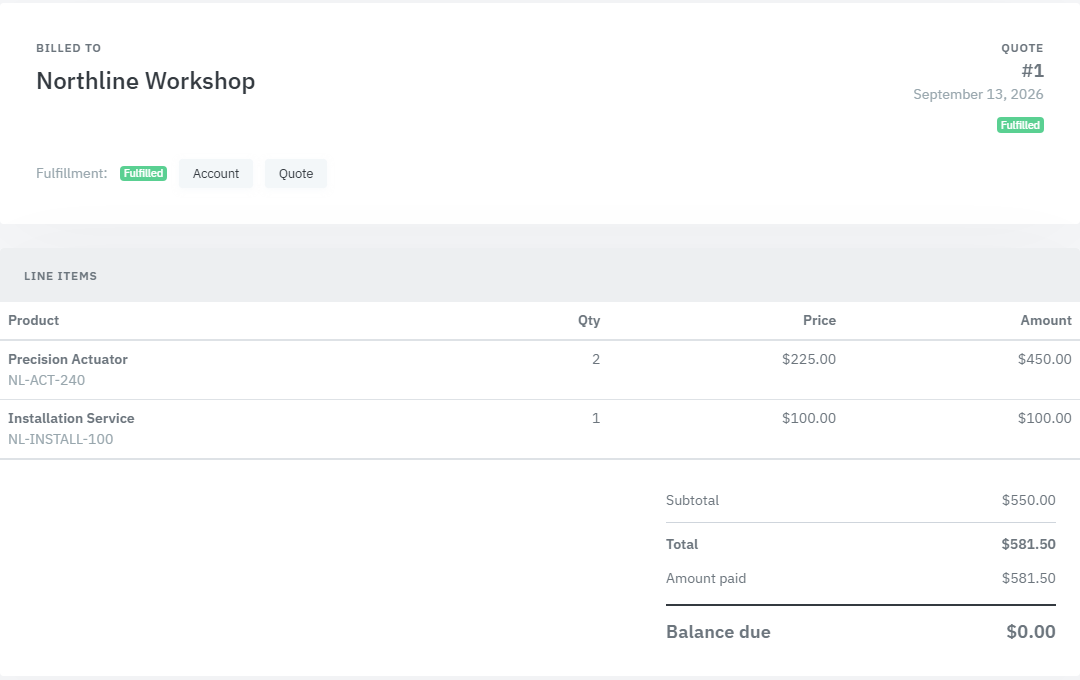
/basket-checkout?BasketID={id}. Verify account, order number, line items, Amount Paid and Balance.Check editability and readiness
A read-only basket hides payment controls. In Card payment, inspect Processor / environment and its readiness message. The form can show No enabled card processor is configured; this needs configuration, not invented card credentials.
Choose the appropriate payment path
Use a saved method
Select Processor / environment, then Saved payment method. Check the intended profile and choose Pay balance. The saved-method action is disabled when the processor is not ready or has no saved methods.
Use a new card when authorized
Enter Card number, Month, Year, CVV and billing first/last name and ZIP. Choose whether to Save payment method, then use Pay balance with new card. The Authorize.Net path tokenizes through Accept.js; operator notes must not substitute for the card form.
Record an external/manual receipt instead
When a receipt was actually collected by an enabled manual method, choose Record manual payment. Enter Payment method, Amount, Payment date, Reference and Notes, then Record payment. This records a receipt; it is not a card charge. This tab is absent when no manual methods are enabled.
Check the recorded result
Wait for the result and re-read Amount Paid and Balance. For a timeout or unclear gateway response, inspect the payment record/provider result before submitting a new payment. Do not equate an interrupted browser response with a failed charge.
Resolve fulfillment independently
Read the fulfillment status
Inspect Fulfillment and its error text. States displayed include Not Ready, Partially Fulfilled, Failed and Fulfilled. Payment may have succeeded while fulfillment remains pending or failed.
Fix the named prerequisite
Resolve the reported product, subscription or integration condition using the related record and your configured operations process. A generic Retry is not a substitute for resolving the cause.
Retry only the unfinished fulfillment
For a paid, not-fulfilled basket the page exposes Retry Fulfillment. Use that after the cause is resolved, then inspect status and generated records. Do not pay again to trigger fulfillment.
Evaluate the opaque-data checkout contract
This is the Feeding Frenzy commerce API used by an authorized checkout caller. It is not the Cloud Commerce Server website inquiry API. The contract below is source-derived and proposed for technical evaluation; it was not runtime-executed for this manual. Never place a real opaque payment token in public documentation.
Source-derived proposed request - not runtime-executed:
POST /api/feedingfrenzy.admin.business/commerce-basket-operations/checkout-with-opaque-data
{
  "BasketID": 7841,
  "PaymentProcessorID": 12,
  "DataDescriptor": "opaqueDataDescriptor",
  "DataValue": "opaqueDataValue",
  "SavePaymentMethod": false,
  "IdempotencyKey": "northline-placeholder-idempotency-key",
  "BillingFirstName": "Avery",
  "BillingLastName": "Chen",
  "BillingZip": "00000"
}
The Northline fixture uses fictional integer BasketID 7841 and fictional integer PaymentProcessorID 12. Human-facing references such as product code NL-ACT-240, conversation reference NL-C-031, and note reference NL-N-118 are separate strings and are never sent in typed ID fields. The descriptor, token and idempotency values are placeholders, and this sample was not runtime-executed.
Generated route and object contract. The generated external/browser JsonWs client invokes /api/feedingfrenzy.admin.business/commerce-basket-operations/checkout-with-opaque-data. Its object carries BasketID, PaymentProcessorID, DataDescriptor, DataValue, SavePaymentMethod, IdempotencyKey and billing first name, last name and ZIP.
Pre-charge rejection contract. A missing basket returns Basket not found.. Voided, deleted or unfinalized baskets are rejected. An unpaid basket with no billable total is rejected. IdempotencyKey is required. The selected processor must exist, be enabled and declare Provider=AuthorizeNet.
Source-shaped proposed success response - not runtime-executed:
{
  "IsSuccessful": true,
  "BasketID": 7841,
  "Status": "Paid",
  "Total": 250.00,
  "TransactionID": "demo-transaction-id",
  "MaskedPaymentMethod": "****1111",
  "Code": null,
  "Message": null
}
Shape and types come from BasketCheckoutResult; all values are fictional and this is not runtime proof.
Source-shaped proposed fulfillment-pending response - not runtime-executed:
{
  "IsSuccessful": false,
  "BasketID": 7841,
  "Status": "Paid",
  "Total": 250.00,
  "TransactionID": "demo-transaction-id",
  "MaskedPaymentMethod": "****1111",
  "Code": "FULFILLMENT_PENDING",
  "Message": "Fictional fulfillment exception message."
}
The source returns the caught fulfillment exception text in Message; the text above is explicitly fictional. Reconcile the paid basket and use Retry Fulfillment without another charge.
Typed result and reconciliation. BasketCheckoutResult contains IsSuccessful, BasketID, Status, Total, TransactionID, MaskedPaymentMethod, Code and Message. A paid basket returns without another charge. A fulfillment exception can return IsSuccessful=false with Status=Paid, Code=FULFILLMENT_PENDING and the failure Message. Reconcile that paid state and use Retry Fulfillment; do not submit payment again.
Product proof
These Phase 1 frames are capture specifications, not application screenshots or runtime evidence.
Commerce integration matrix
This matrix applies to the Feeding Frenzy commerce checkout contract, not the website inquiry API.
| Integration | System of record | Direction | Trigger | Identity mapping | Retry / error behavior | Configuration owner |
|---|---|---|---|---|---|---|
| Checkout caller → Feeding Frenzy basket service | Feeding Frenzy database | Inbound request | Explicit checkout | BasketID / account + PaymentProcessorID + IdempotencyKey | Reconcile basket and transaction state before retry | Installation / delivery owner |
| Feeding Frenzy → configured payment processor | Provider for gateway transaction; Feeding Frenzy for basket/payment record | Outbound | Checkout | Transaction and customer/payment profile IDs | Idempotency plus paid-state reconciliation | Installation owner / provider account owner |
| Feeding Frenzy → fulfillment or subscription processor | Feeding Frenzy for basket; external subscription system where applicable | Outbound after successful payment | Successful payment completion | BasketID / ProductRenewalID / external subscription ID | FULFILLMENT_PENDING then Retry Fulfillment without another charge | Installation / delivery owner |
Fields & records
| Field / record | Meaning or use |
|---|---|
| Amount Paid / Balance | Recorded money and remaining balance, separate from fulfillment. |
| Processor / environment | The actual provider/environment used by this checkout. |
| Reference | External receipt or transaction reference for a manual payment. |
| Retry Fulfillment | For a paid basket whose fulfillment is incomplete; not a second payment. |
Verify the result
- Payment appears once and Balance reflects the intended receipt.
- Fulfillment is complete or its remaining error is explicitly identified.
- Recurring lines link to the resulting subscription/renewal where created.
Troubleshooting
| What you see | What to check or do |
|---|---|
| Processor is not ready | Resolve the displayed configuration/readiness condition. |
| Changing gateway environment after loading a card script | Reload checkout before changing environments; Accept.js is environment-bound in this page. |
| Paid but Failed / Partially Fulfilled | Read the fulfillment error, fix its cause, then Retry Fulfillment. |
| Payment result unknown | Reconcile the transaction before issuing another charge. |
Version & scope
Procedure checked against current Feeding Frenzy forms and services. Source verification is not a claim that a live payment, message, customer transaction or full operator run occurred.
Public guides describe shared controls, records and configuration boundaries using fictional data. Tenant URLs, credentials, customer records, provider identifiers and installation-only procedures belong in customer-controlled documentation and are excluded from public pages and search.
- Version
- 2.0.0
- Change source
- Current Feeding Frenzy forms/services plus reconciled Wiki topics
- Feedback key
guide:payment-fulfillment
Feedback records only the page, guide ID and yes/no choice. It never records documentation search text.
Implementation references (5)
FeedingFrenzy.Admin/wwwroot/kScripts/Baskets/Basket.Checkout.ks.htmlFeedingFrenzy.Admin.Business/CommerceBasketOperations.csFeedingFrenzy.Admin/wwwroot/JsonWs/FeedingFrenzy.Admin.Business.CommerceBasketOperations.ashx.jsFeedingFrenzy.Admin/wwwroot/JsonWs/FeedingFrenzy.Admin.Business.CommerceBasketOperations.jsonFeedingFrenzy.Commerce/Services/BasketCheckoutService.cs