Before you start
- Access to the deployed subscription lifecycle pages and authorized gateway mutations.
- The exact customer renewal and its gateway environment.
- Customer authorization for the intended billing change and reconciliation of any unknown prior operation.
Open in your admin application
Use your installation’s admin address with one of these routes. Replace {id} with the actual record identifier.
/product-renewals/subscription?ProductRenewalID={id}/subscription-newInspect the current lifecycle
Open the lifecycle record
Find the customer in
/product-renewals, then open/subscription?ProductRenewalID={id}. This is the lifecycle workspace; the older product-renewal detail route may show a different generic view.Read the status panel
Check Lifecycle, Gateway Status, Environment, Management, Amount, Next Billing, Last Gateway Sync and Remote Subscription. These fields describe different parts of the relationship.
Refresh and inspect history
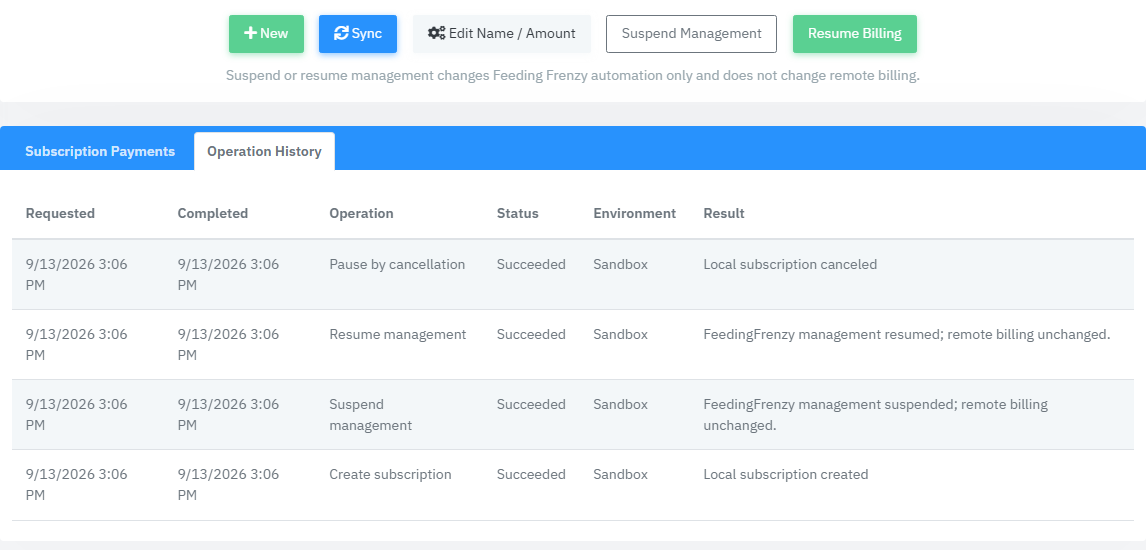
When available, use Sync, then inspect Operation History and Subscription Payments. Record the operation result and environment, not just a status label.
Choose the operation that matches the intent
Change name or amount
Use Edit Name / Amount. Review the Name and Amount fields and save the operation. A blank Name preserves the current remote name. Verify the resulting operation and gateway state.
Suspend only local management
Use Suspend Management to suspend Feeding Frenzy management. Remote Authorize.Net billing is unchanged. Use Resume Management to restore local management. Do not use either button to promise a billing pause.
Pause customer billing
For an Active lifecycle, use Pause Billing and review its confirmation. The implemented pause permanently cancels the remote subscription. The local state records PausedByCancellation.
Resume after that pause
Use Resume Billing. It opens the new-subscription workflow with the predecessor reference. Review account, plan, start date and payment profile. Resumption creates a successor subscription; it does not reactivate the canceled remote record.
Cancel when the agreement ends
Use Cancel when authorized. Verify the operation result, canceled lifecycle and remote status before confirming completion to the customer. Cancellation and a refund are separate business actions.
Handle an uncertain result
If the operation reports an unknown outcome, inspect Operation History and reconcile with the gateway. Do not treat a timeout as permission to issue another create, cancel or resume request. Record the ProductRenewalID, SubscriptionOperationID, environment and exact result for the operator handling reconciliation.
Product proof
These Phase 1 frames are capture specifications, not application screenshots or runtime evidence.
Fields & records
| Field / record | Meaning or use |
|---|---|
| Management | Local automation state only; does not imply remote billing stopped. |
| Pause Billing | Cancellation-based pause of remote billing. |
| Resume Billing | New successor linked to the predecessor, not reactivation. |
| Operation History | Requested/completed timestamps, operation, status, environment and result. |
Verify the result
- The intended operation is recorded in Operation History.
- Lifecycle, remote status and environment agree with the requested outcome.
- A resumed subscription retains the predecessor/successor relationship.
Troubleshooting
| What you see | What to check or do |
|---|---|
| Controls absent while management is suspended | Use the appropriate local management process; the workspace conditionally displays operations. |
| Customer billed after Suspend Management | That operation does not stop remote billing. Use the authorized billing operation instead. |
| Paused record cannot be reactivated | Resume Billing creates a successor. Inspect its creation result. |
| Unknown result | Reconcile gateway and operation history before retrying. |
Version & scope
Procedure checked against current Feeding Frenzy forms and services. Source verification is not a claim that a live payment, message, customer transaction or full operator run occurred.
Public guides describe shared controls, records and configuration boundaries using fictional data. Tenant URLs, credentials, customer records, provider identifiers and installation-only procedures belong in customer-controlled documentation and are excluded from public pages and search.
- Version
- 2.0.0
- Change source
- Current Feeding Frenzy forms/services plus reconciled Wiki topics
- Feedback key
guide:subscription-operations
Feedback records only the page, guide ID and yes/no choice. It never records documentation search text.
Implementation references (3)
FeedingFrenzy.Admin/wwwroot/kScripts/ProductRenewals/ProductRenewal.Details2.ks.htmlFeedingFrenzy.Admin/wwwroot/kScripts/ProductRenewals/ProductRenewal.SubscriptionLifecycle.PageLayouts.sqlFeedingFrenzy.Admin.Business/CommerceSubscriptionOperations.Lifecycle.cs